

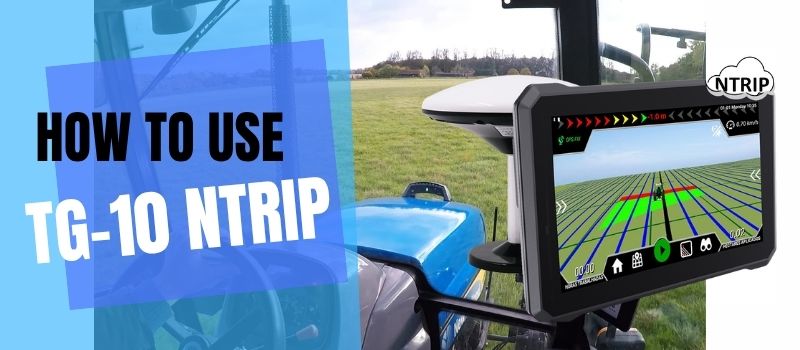
Complete Guide to TG-10 Ultra: Setting Up Your Agricultural GPS Navigation System with RicoNtrip APP
🚜 Precision Farming Made Simple
TG-10 Ntrip is a professional-grade agricultural GPS navigation system designed for precision farming. Whether you're operating a tractor, harvester, or other agricultural machinery, this guide will walk you through the complete setup process using the RicoNtrip APP.
In this comprehensive tutorial, we'll cover everything from connecting to the NTRIP server to configuring your GPS settings and starting your first field operation. By the end of this guide, you'll have your GPS system running with centimeter-level accuracy.
📋 What You'll Need
Before starting, gather the following equipment and information:
- TG-10 Ultra GPS receiver device
- NTRIP account credentials (provided by your RTK service provider)
- Stable internet connection (4G/LTE recommended)
🔧 Step-by-Step Setup Guide
Step 1: Connect to the NTRIP Server
The first step is establishing a connection to the NTRIP correction service server. This provides real-time kinematic (RTK) corrections for centimeter-level accuracy.
- Open the RicoNtrip APP on TG-10Ntrip device.
- Navigate to Server Connection Settings
- Enter the following configuration details according to your account:
- IP Address: XXX.XX.XX.XXX
- Port: XXXX
- Username: XXXX
- Password: XXXX
- Mount Point: XXXX
- Tap Connect and wait for the "SERVER CONNECTED" status indicator
- Verify the connection status shows green/connected
Step 2: Verify GPS Connection
After configuration, verify your GPS is receiving corrections:
- Look for GPS FIX status on the main screen (should be green)
- Verify Satellite Count - minimum 10 satellites recommended for RTK
- Check Position Accuracy - should show 0.2m or better with RTK correction
- Confirm GNSS Status displays "GPS FIX"
Expected Values:
- Latitude/Longitude should be actively updating
- Accuracy: ≤ 0.2 meters (centimeter-level)
- Satellite count: 10-20 satellites tracked
- Speed reading: Should display when moving
Step 3: Set Up AB Point Lines
For farming operations, you'll need to define your field paths using AB points:
- Navigate to the AB Point settings on the main interface
- Drive your vehicle to the starting point of your field line
- Tap Set Point A
- Drive straight to the end point of your field line
- Tap Set Point B
The system will now guide you along this precise path for planting, spraying, or harvesting with minimal overlap.
⚠️ Troubleshooting Common Issues
| Problem | Solution |
|---|---|
| "Server Disconnected" error | Check internet connection; verify IP address and port are correct |
| Low accuracy (>0.5m) | Ensure NTRIP connection is active; wait for more satellites; check mount point |
| No GPS signal | Check GPS antenna placement; avoid obstructions; verify serial port settings |
| Serial port error | Verify correct port selection; restart the APP; check cable connections |
| APP crashes | Reset factory default setting, clear cache |
🌾 Benefits of Precision GPS Navigation
Setting up your TG-10 Ultra with the RicoNtrip APP delivers significant advantages:
- Reduced Overlap: Minimize wasted seed, fertilizer, and chemicals by driving precise lines
- Lower Input Costs: Save 5-10% on seeds, fertilizers, and fuel
- Improved Crop Yields: Optimal spacing leads to better crop development
- Time Savings: Work faster and longer, even in low visibility conditions
- Operator Comfort: Reduce fatigue with assisted steering
- Field Records: Accurate documentation of worked areas
🚀 Ready to Transform Your Farming Operations?
Contact us today for more information about TG-10 ntrip, compatible accessories, and RTK subscription plans.
📚 Frequently Asked Questions
What is NTRIP and why do I need it?
NTRIP (Networked Transport of RTCM via Internet Protocol) delivers real-time correction data from reference stations to TG-10 ntrip tablet. This enables centimeter-level accuracy (RTK) instead of meter-level accuracy typical of standard GPS.
Can I use TG-10 Ntrip without internet?
The TG-10 Ntrip requires an internet connection to receive NTRIP correction data.
Is the RicoNtrip APP free?
The APP is typically included with your TG-10 Ntrip purchase. It is free to use.
What tractors is TG-10 Ntrip compatible with?
TG-10 Ntrip is compatible with all modern tractors and agricultural machinery.


